
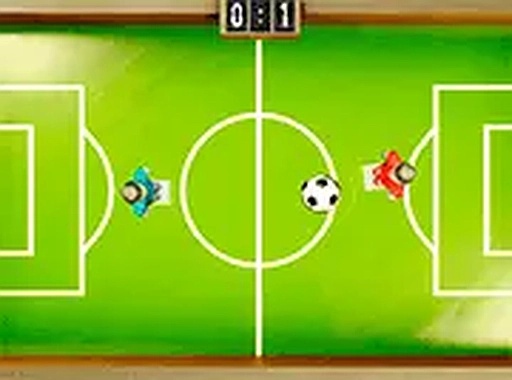
Soccer Blast Arcade Sports
Review
Soccer Blast Arcade Sports is an enjoyable online soccer game that focuses on aiming and shooting. The controls are easy to learn, making it accessible for all ages. The two-player mode adds friendly competition, and the full-screen option enhances the experience. It runs smoothly on any browser without downloads.
Full story
Game Introduction
Soccer Blast Arcade Sports brings the excitement of soccer to your browser with a simple, fast-paced arcade style. In single-player mode, you use your mouse to aim and shoot the ball past the goalkeeper. Each successful goal earns a point, and the player with the most goals wins. The game is easy to pick up but offers enough challenge to keep you engaged. It runs smoothly on desktop and mobile browsers, with no downloads required. The full-screen option makes the action more immersive. Colorful graphics and responsive controls make each match enjoyable. This game is suitable for all ages and provides a safe, family-friendly environment.
How to Play
In single-player mode, move your mouse to position your player and click to kick the ball. Aim carefully and time your shot to beat the goalkeeper. Score as many goals as you can to win the match. In two-player mode, player one uses the mouse, and player two uses keyboard keys. Check the on-screen instructions for specific controls. The goal is to score more goals than your opponent within the time limit. The game encourages friendly competition and helps improve hand-eye coordination. You can play multiple rounds to see who is the best. The simple controls make it accessible for younger players, while the challenge of outsmarting the goalkeeper keeps it interesting for older ones.
Game Features
Fun soccer game with single and two-player modes. Mouse controls are easy to learn. Free to play with no downloads. Mobile friendly and works on any browser. Full-screen option for an immersive experience.
Tips for Success
Practice your aim and timing to consistently beat the goalkeeper. In two-player mode, communicate with your opponent to ensure fair play. Take advantage of the full-screen option to improve focus. Play multiple rounds to develop your skills and learn the goalkeeper's patterns. Stay patient and enjoy the friendly competition.






Reader Comments
Sign in to comment
You must be logged in before posting a review or rating.
No account? Create one
No comments yet. Be the first to comment!