
Tactical Chess: Perspective Switch Edition
Review
This chess title succeeds by focusing on what matters: the game itself. The ability to switch between 2D and 3D views is a nice touch, letting players choose their preferred aesthetic. The local two-player setup is simple and works well for casual play. The lack of ads or purchases keeps the experience pure. While it lacks a computer opponent or tutorials, it serves its purpose as a straightforward digital chessboard for human opponents.
Full story
Visual Perspectives
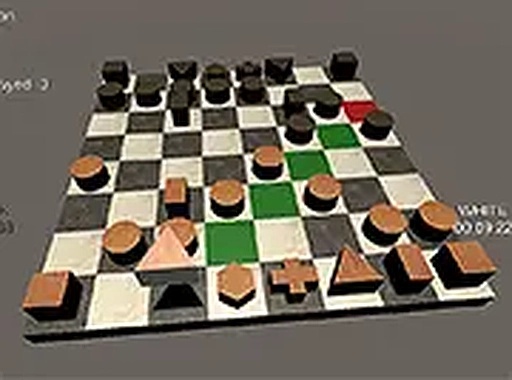
This chess title provides two distinct ways to view the board. The classic 2D top-down layout offers a clear, familiar overview of all pieces and their positions. For those who prefer a more dimensional look, the 3D mode adds depth to the board and pieces, creating a sense of physical space. Players can switch between these views before starting a match, tailoring the experience to their personal taste. Both options maintain the same core gameplay, so the choice comes down to visual preference rather than any functional difference.
Local Two-Player Setup
Designed for face-to-face competition, this game supports two players sharing a single computer. Friends or family members can sit together and take turns moving pieces. The setup is straightforward: select the visual mode, then begin play. No online connection or additional accounts are required. This makes it a convenient option for casual home matches, during travel, or as a quick activity between other tasks. The local focus keeps the experience social and immediate.
Standard Chess Rules
Every move follows the established conventions of chess. All pieces move according to their traditional patterns, and special actions like castling, en passant, and pawn promotion are fully implemented. The objective remains to checkmate the opponent's king. There are no altered rules or house variants, so players familiar with standard chess will feel right at home. Beginners can use this as a practice tool to learn and reinforce proper play, while experienced players can focus on strategy without worrying about rule changes.
Controls and Interface
Moving pieces is handled through either mouse or keyboard inputs. Players can click and drag a piece to its destination square, or click to select it and then click the target square. The interface is clean and uncluttered, with no intrusive menus or pop-ups. This minimal design helps maintain concentration on the game itself. The controls are responsive and smooth, ensuring that actions translate quickly into on-screen results. Whether playing a rapid blitz game or a slow, deliberate match, the input system remains reliable.
Distraction-Free Environment
This game is free from advertisements and in-app purchases. Once launched, there are no interruptions or prompts to buy upgrades or remove ads. The entire focus is on the chess match. This approach suits players who want a pure, uninterrupted experience. It also makes the game suitable for younger players or classroom settings where external content might be a concern. The lack of monetization features means the game functions as a straightforward tool for playing chess without any commercial elements.






Reader Comments
Sign in to comment
You must be logged in before posting a review or rating.
No account? Create one
No comments yet. Be the first to comment!