
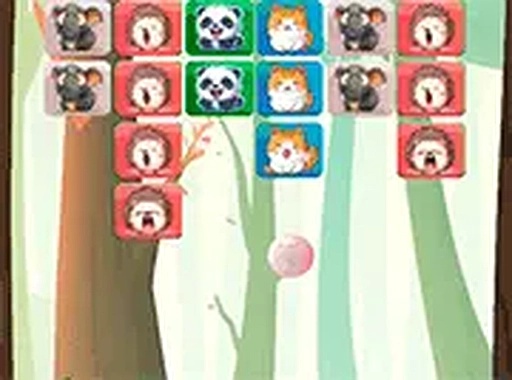
Block Break Arcade Puzzle
Review
Block Break Arcade Puzzle offers a delightful twist on classic block-breaking gameplay. The cute animal characters add personality to each level, making the experience more engaging. Controls are intuitive for both mouse and touch input. The game runs smoothly in any browser with no downloads required. It is a great choice for casual gamers looking for a relaxing yet satisfying puzzle challenge.
Full story
Game Introduction
Block Break Arcade Puzzle is an arcade puzzle game that adds a fresh twist to the classic block-breaking formula. In this game, you control a platform at the bottom of the screen, moving it left and right to bounce a ball upward. The ball breaks through colorful blocks arranged in various patterns. Each level is cleared when you destroy all blocks. The game features adorable animal characters that make the experience more charming. Designed for all ages, Block Break Arcade Puzzle runs smoothly in any browser on mobile or desktop. No downloads are required, so you can start playing instantly. The vibrant graphics and simple mechanics make it a great choice for casual gamers who enjoy a satisfying challenge.
How to Play
Use your mouse on a computer or touch screen on a mobile device to slide the platform left and right. The goal is to keep the ball bouncing so it hits and breaks every block on the screen. Each block you break adds to your progress. When all blocks are gone, you complete the level and unlock the next one. If the ball falls off the bottom of the screen, you lose a life. The game is easy to learn, making it suitable for kids and adults. You can also switch to full screen mode for a more immersive view. Just tap or click to start, and enjoy the rhythmic action of breaking blocks with your animal friends.
Game Features
Cute animal themes add personality to each level. Simple controls make the game accessible for players of all skill levels. Full screen mode provides an immersive experience without distractions. The game is free to play with no hidden costs. No downloads or installations are required, so you can start playing immediately. Each level offers a new block arrangement to keep the gameplay fresh.
Tips for Success
Keep the ball in play by staying centered under it as much as possible. Use the sides of the platform to control the ball's angle—hitting the ball near the edge sends it in a sharper direction. Practice aiming for the top blocks first to create more open space. Take short breaks if you feel frustrated, as staying calm helps with precision. Watch the ball's trajectory and anticipate where it will fall.









Reader Comments
Sign in to comment
You must be logged in before posting a review or rating.
No account? Create one
No comments yet. Be the first to comment!